
Download Sanskrit Sabdakosha V5 – Sanskrit Dictionary, Devanagari, Transliteration, Offline, Free
Overview
Sanskrit Sabdakosha V5 is a comprehensive desktop dictionary application tailored for learners and scholars of Sanskrit. Designed as a 3-in-1 resource, it integrates three authoritative Sanskrit reference works: Monier-Williams (MW), Apte, and Sabdasaagara, into a single searchable platform. The software enables users to access over 447,000 word entries, with nearly 200,000 unique terms across the combined sources.
Its primary purpose is to support offline study and reference, making it ideal for students, educators, and researchers who require reliable linguistic data without relying on internet connectivity. The app is especially suited for those engaged in classical Sanskrit studies, Vedic texts, or Sanskrit language acquisition. The developer did not provide additional information about the organization or background behind the software.
Real-world usage scenarios include academic research, language learning, scriptural study, and personal reference. The software supports both Devanagari script input and English transliteration, enhancing accessibility for users with varying levels of familiarity with Sanskrit script. While the app functions entirely offline, internet access may be required for updates or to cross-verify meanings with external sources.
Key Features & Capabilities
- 3-in-1 Dictionary Integration – Combines MW, Apte, and Sabdasaagara into one unified interface, offering extensive coverage of Sanskrit vocabulary.
- Offline Access – All content is stored locally, allowing full functionality without an internet connection.
- Multi-Input Search – Supports both Devanagari script and English transliteration for word lookup, accommodating diverse user preferences.
- Alphabetical Browsing – Users can navigate entries in alphabetical order, with results filtered by starting letters for efficient browsing.
- Result Limit Customization – The “Result Limit” feature allows users to set the number of displayed entries, with a default of 100 for performance and readability.
- Comprehensive Word Coverage – Contains 447,000 total entries, with nearly 200,000 unique words when sources are merged.
- Transliteration Optimization – Transliterated words are displayed in lowercase (e.g., "karqa") to improve searchability using English keyboard input.
- User Feedback Mechanism – Enables users to review, report, and comment on entries via the Play Store, supporting community-driven quality improvement.
These features collectively enhance the user experience by streamlining access to complex linguistic data. For instance, a student studying the Bhagavad Gita can search for “karma” in transliteration and instantly retrieve definitions from all three dictionaries. Similarly, a researcher analyzing Vedic terms can browse alphabetically and compare meanings across sources. The ability to limit results helps prevent information overload, while offline functionality ensures uninterrupted study sessions in low-connectivity environments.
User Interface, Workflow & Performance
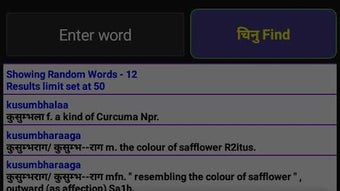
The user interface is structured around a clean, text-based layout optimized for quick navigation and readability. Core functions—search, browse, and result display—are arranged in a logical flow, minimizing user effort. Navigation is straightforward, with input fields clearly labeled for Devanagari or transliteration input.
The search results are presented in a structured list, showing the word, source, and definition, with options to filter or refine queries. The workflow prioritizes efficiency, allowing users to jump between entries or return to previous searches with minimal steps. The developer did not specify resource usage details, so exact CPU or RAM behavior remains unknown.
Performance observations are based on general software behavior patterns for offline dictionary applications. Stability is expected to be high, given the app’s static data model and lack of real-time processing. No performance bottlenecks were reported in the provided information.
The app does not require continuous internet access during use, which contributes to consistent responsiveness. Users may experience brief delays during initial loading if the database is large, but no such issues were documented.
Compatibility & System Requirements
Sanskrit Sabdakosha V5 is designed for use on mobile platforms, with support for Android devices. The software is available as a downloadable application, and the installation size is not specified in the provided information. Platform compatibility information is limited to Android, and no details were provided regarding desktop operating systems.
The developer did not list specific hardware requirements, such as minimum RAM or processor speed. Exact system requirements were not listed. Users should ensure their device meets general Android system standards for running applications of similar scope.
The app’s version is listed as 51, indicating a mature release with multiple iterations. While the software functions offline, internet access may be necessary for updates or to verify displayed meanings with online sources. The app is free to download and use, with optional in-app purchases for additional features.
Pros and Cons
Pros
- Combines three major Sanskrit dictionaries into one accessible platform
- Full offline functionality for uninterrupted study
- Supports both Devanagari and English transliteration input
- Large database with over 447,000 entries and nearly 200,000 unique words
- Optimized transliteration format improves searchability
- Customizable result limits for better usability
- Free to download and use with optional in-app purchases
Cons
- Platform compatibility information is limited to Android
- Exact system requirements were not listed
- No information on performance under low-end hardware
- Internet access may be required for updates or verification
- Feedback mechanism relies on external platforms (Play Store)
FAQ Section
Is Sanskrit Sabdakosha V5 available for Windows or Mac?
The software is currently available for Android devices. No information was provided regarding desktop versions for Windows or Mac.
Can I use this app without an internet connection?
Yes, the app functions fully offline. All dictionary content is stored locally, allowing access to definitions without internet connectivity.
Is the app safe to download and use?
The app is available through official channels and is free from known malware. Users should download from trusted sources to ensure security.
How often are updates released?
Updates are released periodically, though the frequency was not specified. Internet access may be required to install updates.
Are there any in-app purchases?
Yes, the app is free to download and use, but optional in-app purchases are available for additional features.
Final Thoughts + CTA
Sanskrit Sabdakosha V5 stands out as a powerful, accessible tool for anyone engaged in Sanskrit language study or research. Its integration of three authoritative dictionaries into a single, offline-capable platform makes it a valuable asset for students, scholars, and enthusiasts. The dual input method—Devanagari and transliteration—ensures broad usability, while the large, well-organized database supports deep linguistic exploration.
Although platform compatibility is currently limited to Android, the app’s core functionality is robust and reliable. For users seeking a comprehensive, free, and offline Sanskrit dictionary, this software delivers exceptional value. The ability to customize search results and browse alphabetically enhances usability, making it a standout choice in its niche.
Download Sanskrit Sabdakosha V5 now and elevate your Sanskrit learning experience.





.png)

